Shortcuts Guidelines in Benkyo Box
I recently built Shortcuts actions for Benkyo Box so that you can automate it. Shortcuts actions are implemented via the AppIntents framework. Learning how to use it was easy, but learning how to use it right wasn't, involving watching numerous WWDC videos that changed guidelines throughout the years and trial and error. A good use of the framework helps us build actions that are easy to understand, interoperate, and organize for anybody using the Shortcuts app.
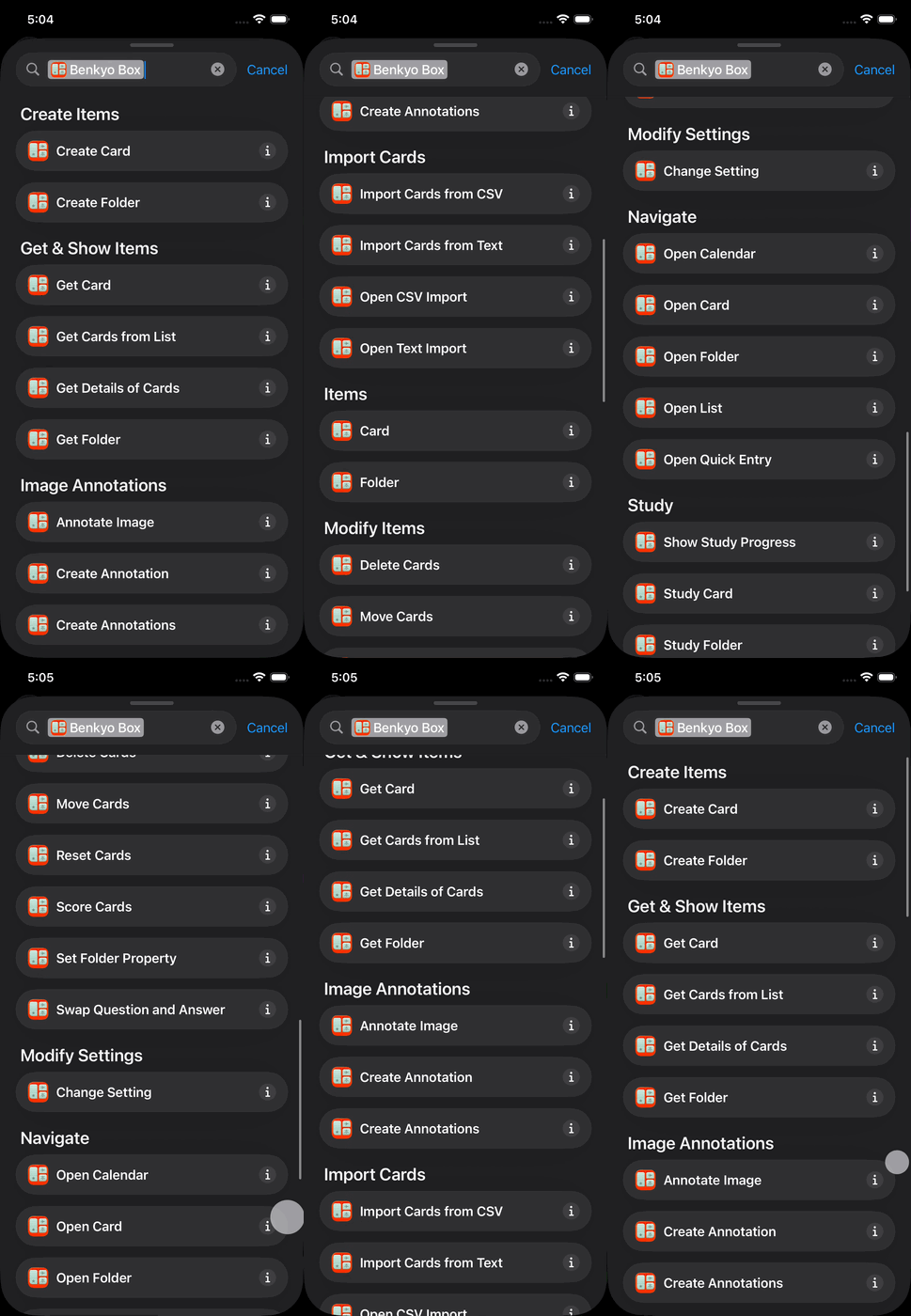
In this article I'll focus on design guidelines for AppIntents in Benkyo Box. These could be helpful for your app, but be aware that these are not official guidelines - this is what I found to work best for Benkyo Box.
First, let's talk about its programatic interface. At its core, AppIntents is a framework that exposes functionality of an app to the system using a simple, command-pattern-like interface called AppIntent. These are its main components:
AppIntent - A struct that defines an action your app can make, from some standard inputs of the system, and providing a standard type of result the system can use. Its parts are:
- Parameter names and types, defined via the property wrapper
@Parameter, limited to types conforming toIntentValue. Strings, Ints, Dates conform to it. Custom types that implementAppEntityalso do. - A
performfunction that can be sync or async and can return a result, which can be any combination of:- A value that, like parameters, must conform to
IntentValue - A view that can display the result, displayed without opening the app.
- iOS 26, macOS 26 By implementing SnippetIntent, the view can be interacted with. Whenever this interaction results in updates to the Intent's parameters, the intent re-executes to refresh the view. Whether or not you need this depends on the level of interactivity desired.
- An openAppIntent that executes right after this intent finished, opening the app somewhere. This intent must conform to
OpensAppIntent, which causes the system to launch the app before it executes. - A dialog to be spoken
- A value that, like parameters, must conform to
- Various metadata-defining functions such as title, description, etc, used to display the intent around different areas of the system.
AppEntity - A user-friendly version of the model of the data in your app, exposed to the AppIntent system. You use these to enable users to select entities of your app on shortcuts that act on them, discover them in Spotlight, and pass them around Shortcuts actions as common currency.
Here's an example with all of these parts:
struct GetCardIntent: AppIntent {
    static let title: LocalizedStringResource = "Get Card"
    static var displayRepresentation: DisplayRepresentation {
        DisplayRepresentation(
            title: "Get Card",
            image: .init(
              systemName: "square.text.square.fill"
            )
        )
    }

    @Parameter(title: "Card")
    var card: CardEntity

    static var parameterSummary: some ParameterSummary {
        Summary("Get \(\.$card)")
    }

    func perform() throws -> some IntentResult &
        ReturnsValue & ShowsSnippetView
    {
        let context = modelContainer.mainContext
        let cardItem = try context.fetchItem(uuid: card.id)
        return .result(value: card)  {
            AppIntentCardView(
                item: cardItem,
                modelContainer: modelContainer,
                cardEntity: card
            )
        }
    }
}
AppEntity parameter (card), its perform function and various results: a value and a view, but no dialog nor opensIntent.Defining AppIntents and AppEntities in your code allow it to integrate with features of the system, including Shortcuts, Widgets, Spotlight, and Siri. While some of these features require you to do some legwork before the intent adds new functionality, Shortcuts is automatic - implementing an intent automatically exposes it to Shortcuts as an action, ready for people to use in their scripts.
That results in a problem: implementing an intent effectively exposes a public API of your app for clients to use. Once you expose a public API with a signature, changing it is problematic because it breaks automations that people have carefully built. That makes it important to get it right the first time before releasing them: changes in the future could either break people's scripts or explode your shortcuts with numerous new and deprecated versions of slightly similar actions.
Designing Intents
So we've established that getting the intent's signature right is important. How do we design it? It's similar to designing a public API, with extra considerations – you ask the following questions:
-
What does the intent do?
Intents generally do one of these things: Change something in the app, show something, say something, and/or open the app.
-
What is its name?
Intents have common naming conventions, such as starting with a verb. It's important to follow them to be discoverable.
-
What kind of parameters does it receive?
Intents can receive common AppIntent currency that can interoperate with other intents, such as
String,IntandIntentFileandDate. They can also receive your ownAppEntitiesand arrays. The choice of parameter type determines:-
The kind of control that Shortcuts uses to allow you to set the value. For example,
IntentFileresults in Shortcuts presenting a file picker for picking a file if the value is missing. The intent can still receive Strings and other types as input from other intents, but your intent will still see them as files. Receiving an AppEntity allows you to pick an entity from a "suggestions" list you define. However, in order to be able to connect your entity to other actions from other developers, you'll have to implement conversions to those types (out of the scope of this article). -
How easy it is to interoperate with other intents. For example, if an intent returns an array of entities, it's easier to interoperate it with intents that receive arrays of entities.
-
-
What does it return?
Like regular functions,
AppIntentscan return values to pass to other intents. Additionally, they can return other values that determine their behavior:- A view. It'll show the value of the intent. When this is included, the intent will gain the Show when Run capability (defaults to on).
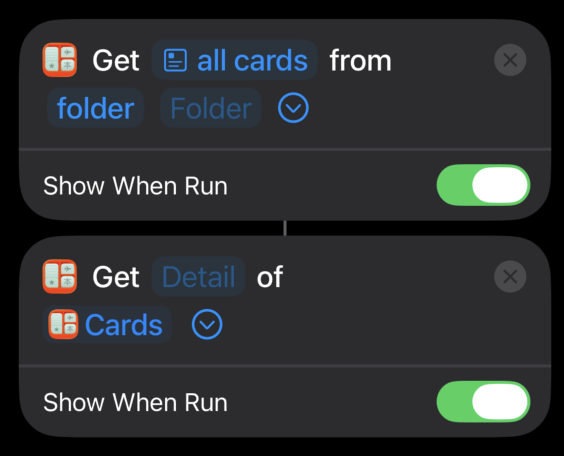
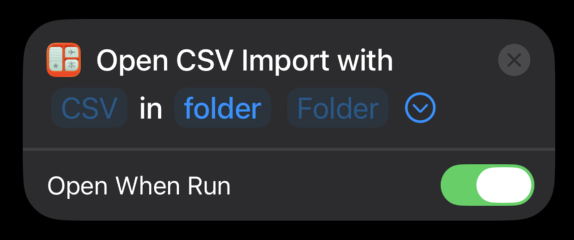
The Show when Run option iOS 26, macOS 26 If the Intent conforms to SnippetIntent, the view can be refreshed when the intent's entity properties update.- An openIntent intent that opens the app. If your intent should launch the app in addition to doing what it does, it should always rely on another intent specialized on opening the app somewhere. When an intent gets
openIntent(or has the foreground mode) they gain the Open when Run capability.
The Open when Run option - A dialog. This is a string that is spoken after the intent runs, describing what happened. This is important for integrations such as Siri, where the intent might run while you are not actively looking at the screen.
What you'd want to return depends on the kind of intent you are making. While it may seem advisable to return as many outputs as possible to make the intent more flexible, in practice returning an unnecessary value can hinder the user experience. For example, if a Shortcuts action's purpose is to pass your entities to other intents, it is annoying when it also opens the app, and turning it off requires turning off a switch.
-
Does it run in the background, launch the app or both?
An intent may run in the background without launching the app (the default). You can also choose between:
- start in the background, then complete by opening the app
- open the app first, then execute
It is worth noting that your intent can fully run in the background and not launch the app on its own, delegating opening to the
opensIntentresult it can return. This to me was the most common scenario - only a few intents open the app, while the majority do their action in the background, delegating opening to theiropensIntent. -
What Summary does it display?
A summary is a sentence displayed when the intent is added as an action to a Shortcut. The intent's parameters can be made part of the sentence to clarify their role in the shortcut, and they can be interacted with to update them.
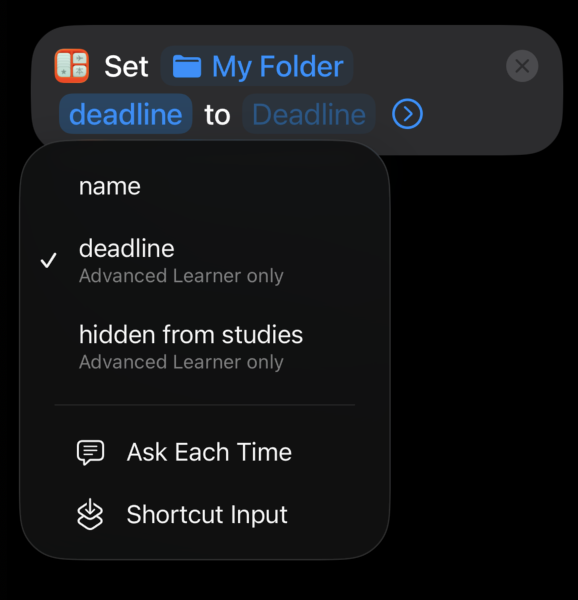
The summary of a Set Folder Property Shortcuts action It's important that the sentence starts with the same verb that the intent name starts with so that it's easy to identify what type of intent we are looking at. If a parameter has dependencies, the summary should only show it if the dependencies are met. For instance, a summary
"Get {list} filtered by {filter}", should only displayfiltered by {filter}when the chosen{list}supports filtering.
Intent Categories
Those are many questions! It's easier to answer these questions by grouping intent types into broader Intent Categories with answers to these questions. I've identified these categories from observing Apple's own implementations:
- Open Intents
- Entity Intents
- Query Intents
- Mutation (including Delete) Intents
- Creation Intents
Apple designates a similar set of categories in - WWDC 2021 - Design great actions for Shortcuts, Siri and Suggestions - highly recommended that you watch this as well. The aforementioned categories were still helpful for me to define common answers to the main questions.
Open Intents
Open intents launch the app in a screen. There are 2 types of Open intents: intents that open screens of entities and intents that open an arbitrary screen. Intents that open entities implement the OpenIntent protocol, with target containing the opened entity:
struct OpenFolderIntent: OpenIntent {
    ...
    @Parameter
    var target: FolderEntity
    ...
}
These are specially useful because they additionally integrate with Spotlight - display an entity in search results and if an OpenIntent for it is available, tapping on it navigates to it.
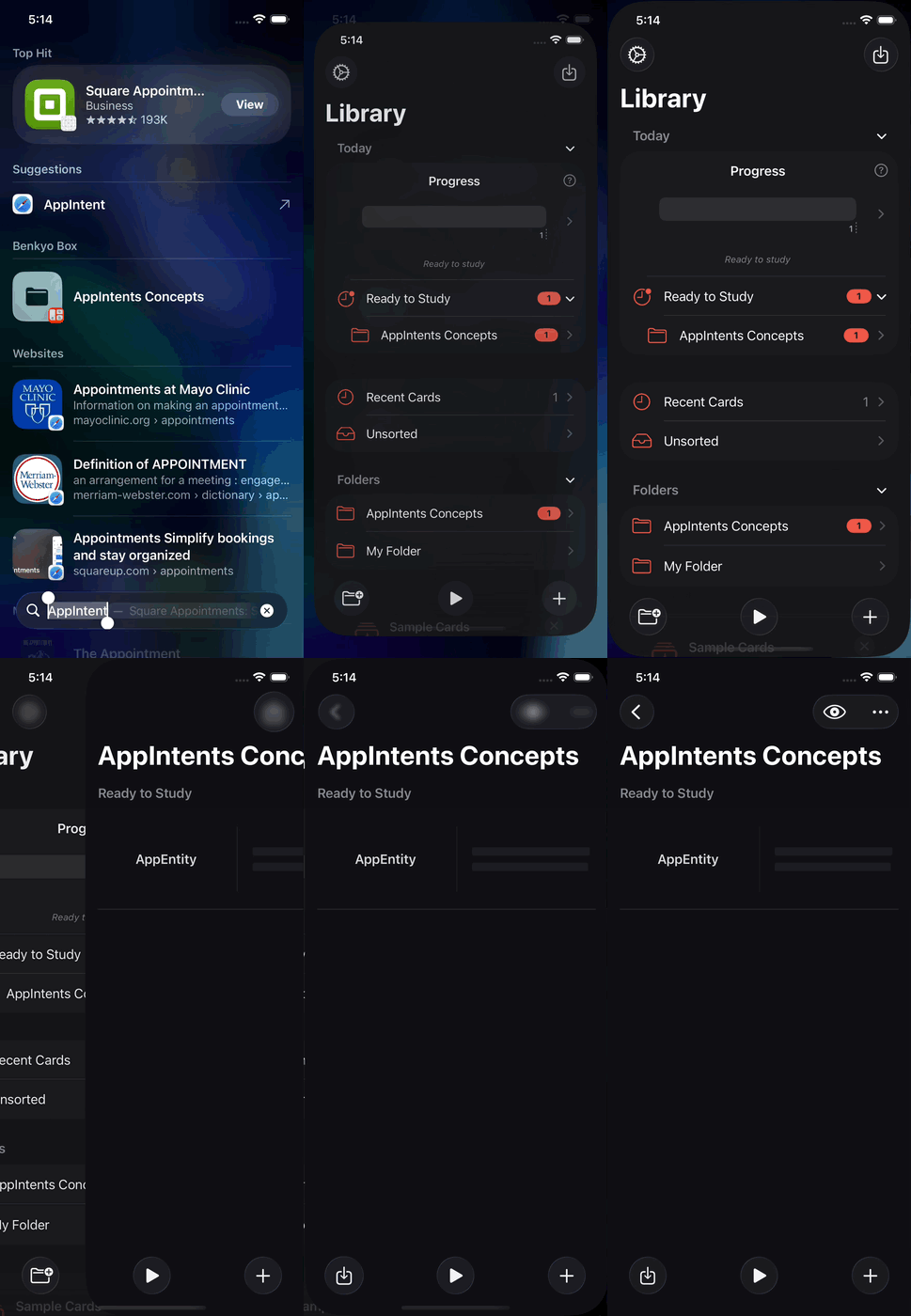
Some Open intents may open a screen of the app not associated with an entity, such as a Calendar - these involve a little more manual work:
struct OpenCalendarIntent: AppIntent {
    var date: Date?

    @available(iOS 26.0, macOS 26.0, *)
    static let supportedModes: IntentModes = [ .foreground ]
    ...
}
These intents need to tell the app that they support foreground execution explicitly, either via the backgroundModes (iOS 26, macOS 26) or openAppWhenRun (earlier versions).
That'll cause the system to launch the app automatically when invoked. Any properties that are required will be prompted before the app is launched.
If, for some reason, it makes more sense to request the property after the app is visible, you can make the property optional and have it throw an error when it's missing with:
func perform() {}
 ...
  if myProperty == nil {
    throw $myProperty.needsValueError(
      "What is the My Property?"
    )
  }
  ...
}
That said, Apple recommends not requiring any properties and have default behavior that makes sense, such as opening the calendar in today's date when the date is omitted.
Since the purpose of these intents is to open the app, they don't return any value, show any snippet nor say any dialog. Any of these things gets in the way of using them. So the answers to the main 4 questions are:
Open Intents Decisions
-
What do they do?
Open the app somewhere
-
What is their name?
Open
{Entity|Screen} -
What kind of parameters do they receive?
The target to open, if any.
-
What do they return?
| Value | View | Interactive Snippet | Dialog | openIntent |
|---|---|---|---|---|
| None | None | None | None | None |
-
Which background modes?
Foreground
-
Example summaries: Open
{target}- Example for an "Open Folder" intent. Here the target is aFolderEntityto be openedOpen Settings - no parameter, since there's only 1 Settings screen
Entity Intents
Entity intents allow you to pass-through one or more entities as output to other actions. They don't do anything else, making their implementation very simple. Here's an example:
struct FolderIntent: AppIntent {
    static let title: LocalizedStringResource = "Folder"

    static let description = IntentDescription(
        "Choose folders to use as output.",
        categoryName: "Items",
        resultValueName: "Folders"
    )

    @Parameter(
        title: "Folders",
        description: "The folders to pass through."
    )
    var folders: [FolderEntity]

    static var parameterSummary: some ParameterSummary {
        Summary("\(\.$folders)")
    }

    func perform() throws ->
        some IntentResult & ReturnsValue<[FolderEntity]>
    {
        .result(value: folders)
    }
}
An entity intent has 1 parameter: an array of the entity, and return the same array. They are used to create variables in Shortcuts with with one or more instances of the entity. Pressing (+) allows you to select more.
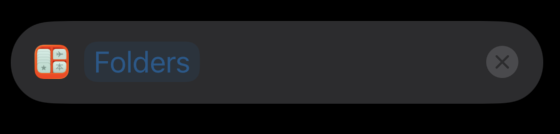
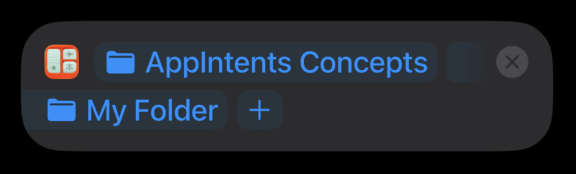
Unlike "Query" intents, which we'll see shortly, they don't show anything. They are intended to run in the background and not open the app.
Entity Intents Decisions
-
What do they do?
Pass through 1 or more instances of an entity as output
-
What is their name?
{EntityName}Unlike other intents, these ones don't start with a verb. -
What kind of parameters do they receive?
An array of
{EntityName} -
What do they return?
| Value | View | Interactive Snippet | Dialog | opensIntent |
|---|---|---|---|---|
The input array of {EntityName} |
None | None | None | None |
-
Which background modes?
background
-
Example summaries:
{EntityName}
displayRepresentation in the AppEntity with an icon representing the entity and a text label that best describes it (such as a folder name).
Query Intents
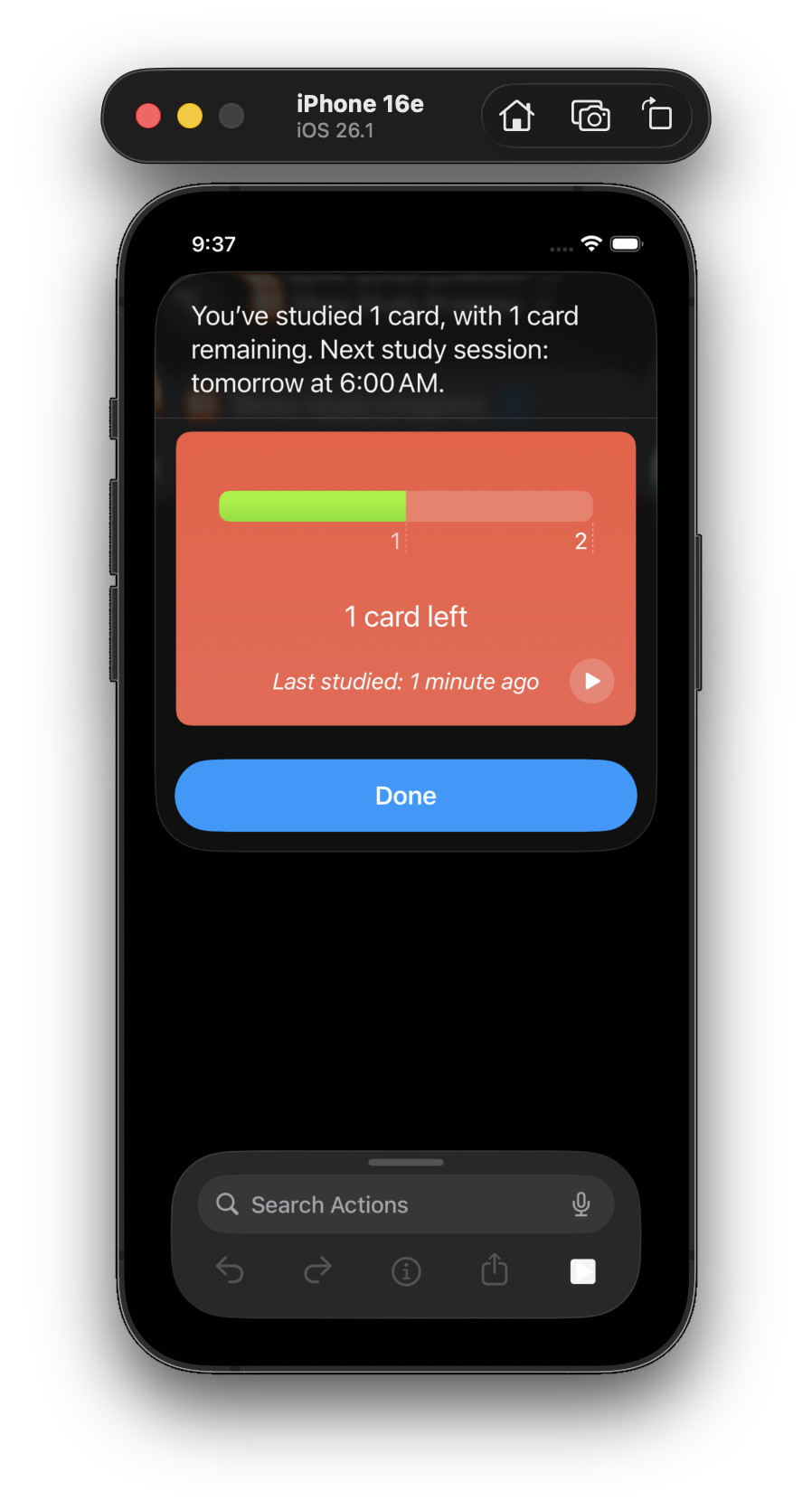
Query intents get something (an entity, multiple entities, or a result) and either show it, return it or both. They generally don't open the app, but you could interact with the shown view to open it. They typically start with "Get".
For example, an intent "Get Study Stats" gets today's stats, shows a view and returns an entity or file for the stats that other intents can use.
Query Intent Decisions
-
What do they do?
Get data from the app and may show it, return it, or both.
-
What is their name?
Get
{Entity|Data}Sometimes:
Show
{Entity|Data}- When the intent returns nothing and only shows the value. -
What kind of parameters do they receive?
If getting an entity, receives the entity. Otherwise any parameters that describe how to get it, like filters.
-
What do they return?
| Value | View | Interactive Snippet | Dialog | opensIntent |
|---|---|---|---|---|
| Optional: Data that is being fetched - a file, entity, list of entities, etc |
Optional: A view that displays the value. |
Optional: A view that displays and allows interacting with the value. |
Optional: A dialog that describes the value. |
None (they don't foreground the app, only "Open" do) |
-
Which background modes?
Background
-
Example summaries:
Get
{photo}- For a "Get Photo" intent that receives the photo.Get cards from
{folder}filtered by{filter}- Example of a "Get Cards from Folder" intent. It gets a list of items filtered by a filter.
Mutation (and Deletion) Intents
Mutation intents update data in the app. It can be each entity of an array of entities. They may also update a global value like UserDefaults, or something in the server that eventually will down-sync.
When they deal with entities, they preferably receive arrays and act on them because that way they can easily mutate all entities in arrays returned by Entity and Query intents. They are still compatible with single-Entity-returning intents because shortcuts automatically converts Entity to [Entity] when connecting an Entity output to an [Entity] input.
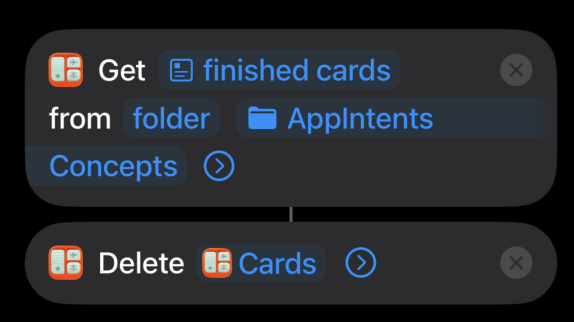
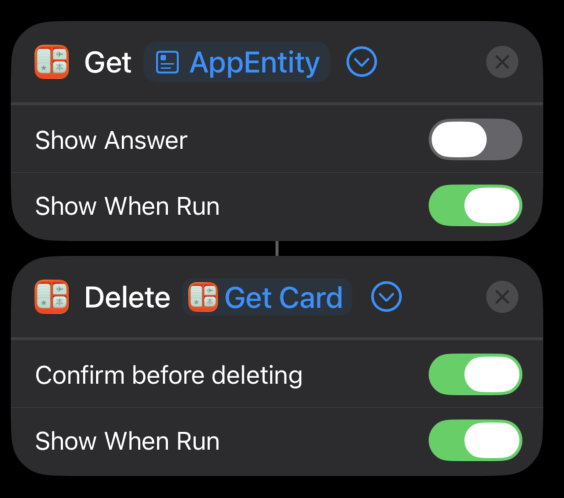
Mutation intents are prefixed with the verb that describes the action of the mutation, such as Reset Cards, shown here, which resets all cards in all input [CardEntity].
struct ResetCardsIntent: AppIntent {
    @Dependency private var modelContainer: ModelContainer

    var cards: [CardEntity]
    static var parameterSummary: some ParameterSummary {
        Summary("Reset \(\.$cards)")
    }

    func perform() throws -> some IntentResult & ReturnsValue<[CardEntity]> & OpensIntent {

        let context = ModelContext(modelContainer)

        var cardEntities: [CardEntity] = []
        // Fetch items from card IDs and reset each one
        for cardEntity in cards {
            let card = try context.fetchItem(id: cardEntity.id)
            try context.reset(card)
            cardEntities.append(CardEntity(persistentModel: card))
        }

        let target = commonFolder(of: cards) ?? ListType.recents
        let openIntent = OpenListIntent()
        openIntent.list = target
        return .result(
            cardEntities,
            dialog: LocalizedStringResource(
              "Reset ^[\(cards.count) cards](inflect: true).").inflected,
            opensIntent: openIntent
        )
    }
Note that in this example, the intent also returns an opensIntent result. This allows the intent to optionally launch the app when the change finishes. It also returns a dialog to tell you what happened while the device is locked. Apple recommends that any update also optionally launches the app in the affected data. In my experience this depends on the context, since some values don't have 1 logical location in the app. I've also seen that it's not useful to open an app's settings when an intent changes a setting. Additionally, if the mutation is destructive, such as a "Delete Card" intent, definitely don't open the app, since a deleted card can't be shown.
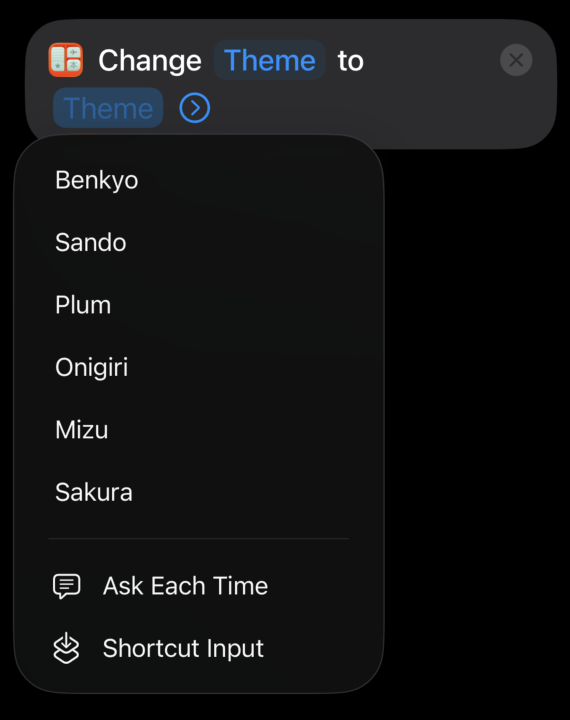
When mutation intents directly update properties, they are typically prefixed with "Set" or "Change". It is preferred to only have 1 of such an intent that can update any property on the entity (selected via an enum) over having 1 intent per property.
Here's an example (for Change Setting, which changes a global setting).
struct ChangeSettingIntent: AppIntent {

    var setting: AppSetting // an AppEnum for settings

    // all optional, since they depend on which setting is shown:

    @Parameter
    var themeFamily: ThemeFamilyNameEnum?

    @Parameter
    var soundEffectsEnabled: Bool?
    ...
    ...

    static var parameterSummary: some ParameterSummary {
        Switch(\.$setting) {
            Case(.themeFamily) {
                Summary("Change \(\.$setting) to \(\.$themeFamily)")
            }
            Case(.soundEffectsEnabled) {

                Summary("Change \(\.$setting) to \(\.$soundEffectsEnabled)")

            }
            ...
            ...
        }

    }

    func perform() async throws -> some IntentResult & ProvidesDialog {
        ...
        switch setting {

        case .themeFamily:

            // enforce non-optionality in a per-property basis
            guard let themeFamily else {
                throw $themeFamily.needsValueError("Which theme colors?")
            }

            userDefaults.themeFamily = themeFamily.themeFamilyName.rawValue

            ...

        return .result(dialog: "Changed \(setting).")
    }
Note that this intent changes any setting, and only returns a dialog telling you what happened. I figured that it wouldn't be useful to open settings here, so I left out the opensIntent result.
Mutation Intents Decisions
-
What do they do?
Change an array of entities by performing a mutating action on them or setting a property directly.
-
What is their name?
{Action}{Entities}Set Property of
{Entities} -
What kind of parameters do they receive?
- Optionally: the entity to change
- Optionally: the property of the entity to change
- Arbitrary action parameters (e.g.
scoreof aScoreaction)
-
What do they return?
| Value | View | Interactive Snippet | Dialog | opensIntent |
|---|---|---|---|---|
| Optional: The input entities, so that their new values can be seen and passed through. |
Optional: A view showing the entity with the new value. Trickier when returning arrays, though. |
None | Optional: A dialog that describes the change |
Optional: An Open Intent that opens the location of the updated entities/setting. Don't use openIntent for actions that delete an entity. If an action affects a source and a destination, open the app in the destination (for example in a Move Documents intent) |
-
Which background modes?
Background
-
Example summaries:
Score
{cards}- Example for a "Score Cards" intent. Cards is an array of cards to score.
Creation Intents
Creation intents create new entities in the app. They receive any inputs needed to create the entity (as many optional as possible) and return the created entity. They should return an opensIntent to open the newly created entity, so that you can see what was just created. They may also show a snippet view to preview the created entity without opening the app.
Here's an example of Create Card, which creates a new flashcard:
struct CreateCardIntent: AppIntent {
    @Dependency private var modelContainer: ModelContainer

    @Parameter
    var question: String?

    @Parameter
    var answer: String?

    @Parameter
    var folder: FolderEntity?

    func perform() async throws -> some IntentResult & ReturnsValue<CardEntity> & ShowsSnippetView & OpensIntent {
        let context = modelContainer.mainContext

        // Create the card

        let cardItem = try context.addNewCard(
            question: .text(question),
            answer: .text(answer),
            in: folder?.folder)

        let cardEntity = CardEntity(persistentModel: cardItem)

        // Open the card after creation
        let openCardIntent = OpenCardIntent()
        openCardIntent.target = cardEntity

        return .result(
            value: cardEntity,
            opensIntent: openCardIntent
        ) {
            AppIntentCardView(item: cardItem, modelContainer: modelContainer)
        }
    }
}
Creation intents support both background and foreground modes.
Creation Intents Decisions
-
What do they do?
Create new entities in the app, either in the background or by launching the app and opening an editor.
-
What is their name?
Create
{Entity} -
What kind of parameters do they receive?
Parameters used to create the entity. Prefer making as many of them optional so that if nothing is passed, the app launches in an empty entity that can be edited.
-
What do they return?
| Value | View | Interactive Snippet | Dialog | opensIntent |
|---|---|---|---|---|
The created {Entity} |
Optional: A preview of the created entity. If the entity is typically created empty, it's best to omit this. |
Optional: An interactive snippet that shows the entity and allows updating it with additional values (for example, increase the minutes of a new timer) |
Optional: A dialog that confirms that the entity was created. |
An Open Intent that opens the newly created entity. If it has edit mode, prefer launching in edit mode. |
-
Which background modes?
Background
-
Example summaries:
Create Card with
{question}and{answer}- Example of a Create Card intent. Question and answer are optional, and the created card is optionally navigated-to in the app.
Other considerations
There's more to think about than what I describe here, such as
- Schemas for Apple Intelligence
- AppEntity Queries and suggestions
Transferableto make your internal AppEntities compatible with other app actions.IndexedEntityto expose an entity to Spotlight
Also, this is obviously focused on Shortcuts and is my first stab at making sense of my decisions when designing Benkyo Box intents. Intents for Apple intelligence conform to Apple's own schemas and have a variety of shapes, which may or may not be easy to make compatible with these shapes. I recommend watching Apple's own WWDC videos on the subject, even though, I have to say, there's an overwhelming number of them. Here's the ones I saw before writing this:
- WWDC 2024 - Bring your app's core features to users with AppIntents - good intro to intents
- WWDC 2021 - Design great actions for Shortcuts, Siri and Suggestions- Probably the most thorough design guideline on intents for shortcuts. I saw this a little too late in the process because it's old :)
- WWDC 2024 - Design for AppIntents for System Experiences - This one is good for understanding the latest guidelines regarding launching the app or not.
- WWDC 2024 - What's new in AppIntents - more in depth on Transferable, IntentFile, etc
- WWDC 2025 - Explore new advances in AppIntents - lot's of good info on interactive snippets and background / foreground modes